

Entrepreneurs exploring video production may focus primarily on impressive visuals via expensive cameras, since viewers are immediately drawn to what they see. However, sound quality plays an equally (maybe more) vital role in captivating your audience.
Shooting marketing video in-house with iPhones or high-end cameras is appealing because it feels faster, cheaper, more authentic, and more controllable than hiring an outside team. Those benefits are real, especially for informal, frequent content, but they are often outweighed by one hard truth: audiences will tolerate “good-enough” visuals far longer than they will tolerate “hard-to-listen-to” audio, and poor audio can actively reduce perceived credibility even when the message itself is identical.
Controlled research in Science Communication found that when people consumed identical talks/interviews presented with degraded audio, they rated the talk and speaker less favorably; they perceived the speaker as less intelligent/competent and the research as less important, and they were less likely to share the interview on social media, despite identical content. That matters for marketing because credibility strongly influences message acceptance and downstream behavior. Higher source credibility generally increases communication effectiveness and can drive attitude change.
DIY audio problems are not primarily about whether the camera is an iPhone or a “Netflix-approved” cinema body, most buyer-facing audio failures come from microphone choice/placement, uncontrolled room acoustics, background noise, wind/handling noise, inconsistent levels, and sync issues. Smartphones add extra unpredictability because their audio chain often includes speech-optimized processing (e.g., multi-mic noise reduction/beamforming and automatic gain control) that can change the sound in ways your team didn’t intend.
Professionals (including your ruef Creative team) reduce these risks by planning audio at pre-production, controlling spaces, using appropriate microphones and monitoring, and finishing audio in post so it meets loudness and intelligibility expectations across platforms and devices.
Why in-house video wins on paper
The business case for DIY video is straightforward: short cycle times, lower cash outlay, more content per week, tighter control of messaging, and “in the room” authenticity. Those advantages are especially compelling when teams already have capable cameras (phones included), and when content value comes from immediacy (updates, quick explainers, behind-the-scenes, hiring moments).
The catch is that a DIY approach often treats audio as a secondary concern, something “built-in” to the device or “fixable later.” Modern devices do capture usable audio in certain conditions, but the audio chain in consumer devices is often designed around speech capture for communications and convenience, including processing that can be good for calls yet awkward for marketing polish and brand consistency.
A useful way to think about DIY practicality is this: visuals are often predictably improvable (lighting tweaks, stabilization, framing), while audio is often fragile (a single HVAC rumble, reverb-heavy room, or clipped moment can make a whole take unusable). Speech perception research also makes clear that noise and reverberation increase listening effort and reduce intelligibility, conditions that are common in offices, warehouses, lobbies, and “real” work environments where companies like to film.
Where DIY audio breaks down in the real world
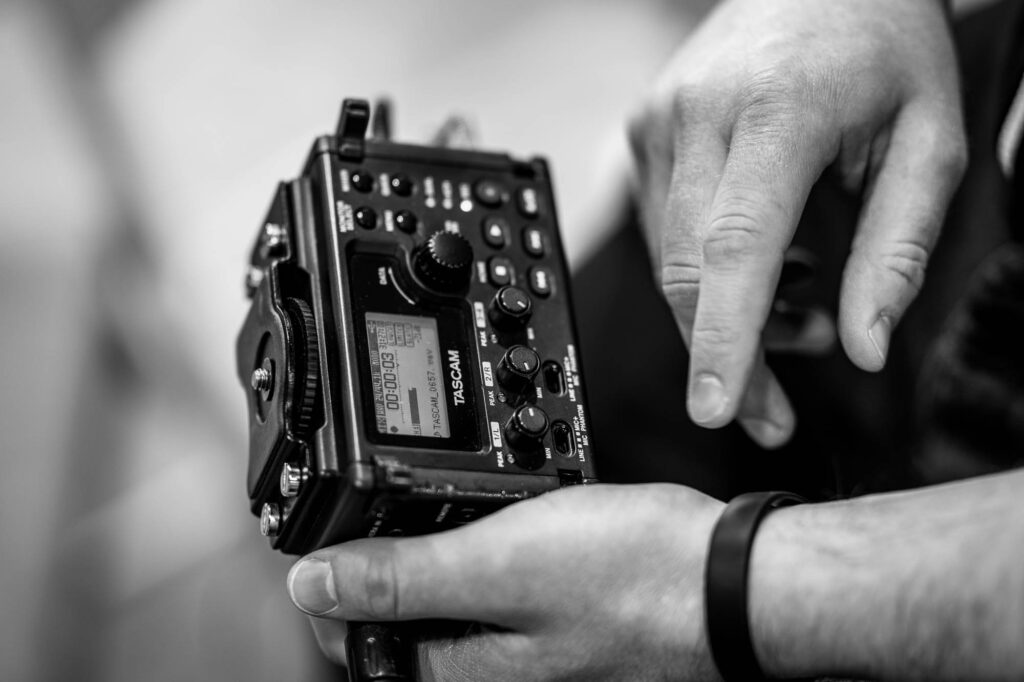
The recurring failure in DIY video is that the camera (phone or cinema) is treated as the audio recorder. That encourages far-mic recording, uncontrolled sound reflections, and inconsistent levels, which are exactly the conditions most likely to damage comprehension and credibility.
Microphone choice and distance errors
Most phones and cameras use small omnidirectional microphones that capture both voice and room noise, which can be problematic in loud or echoing environments. Although newer smartphones may feature multiple mics for noise reduction, a primary omnidirectional mic is still standard. Moving the mic farther from the speaker increases room noise, making recordings less clear. DIY crews often accept built-in mic audio to avoid visible mics, but this results in poor sound quality that’s hard to fix later. Upgrading to Bluetooth or lavalier mics can improve volume, but may cause latency, distortion, handling noise, or syncing challenges, complicating post-production and negating some benefits of DIY video.
Room acoustics and background noise you stop noticing
Marketing teams film where the story is: offices, shop floors, showrooms, conference rooms. These are rarely acoustically friendly. Reflective surfaces (glass, drywall, concrete) add reverberation; HVAC and equipment add steady noise floors; and open spaces create unpredictable reflections, making dialogue harder to understand and increasing listener effort.
A related professional blind spot is monitoring: many DIY teams don’t hear problems until reaching the editing phase. The human brain is exceptionally adept at ignoring background noise over time, which means you may not even notice secondary sounds until later review in a different environment. Directly monitoring the live audio capture in a controlled manner allows for proper adjustments and mitigation of problems that would go unnoticed with unmonitored audio.
Wind noise and equipment noise
Outdoors, wind noise can overwhelm speech, particularly with small mics and no proper wind protection. Commercially available windscreens can provide on the order of about a 15–25 dB reduction in wind-induced noise, depending on conditions, without significantly impacting spoken audio.
Indoors, a different version of “wind” happens: handling noise and vibration transferred through tripods, handheld rigs, desks, and mic mounts. Even when it’s subtle, it shows up as low-frequency thumps and rumble that distract listeners and eats headroom (forcing you to keep dialogue quieter to avoid clipping).
Levels, clipping, and auto-gain surprises
DIY audio commonly fails in two opposite ways: too quiet (viewers can’t hear) or clipped (distorted peaks). Small devices and “camera-first” workflows also invite automatic level control. In smartphone audio chains, automatic gain control (AGC) is common and can meaningfully diminish measurement accuracy; more broadly, speech-optimized AGC can create pumping artifacts, pull up room noise between words, and make different takes sound inconsistent.
Sync errors that viewers instantly feel
Audio-video sync is another DIY “invisible” risk: a slight delay between mouth movement and speech can make a video feel unprofessional or “off,” even if viewers can’t explain why. In professional broadcast/film contexts, the Society of Motion Picture and Television Engineers (SMPTE) notes that audio-to-video timing errors (“lip-sync errors”) have become commonplace because audio and video travel through different processing paths with different timing factors.
Recent research that frames sync as a major quality defect in production notes that even 45 milliseconds of discrepancy can degrade viewer experience enough to warrant manual quality checks over entire movies. Marketing videos don’t undergo studio QC, so DIY pipelines can ship subtle sync issues without realizing it, especially when combining separate audio recordings, Bluetooth mics, wireless lavs, or AI cleanup tools.
Post-production gaps and why “fix it in post” fails
DIY teams often underestimate how much audio “finishing” is required to make speech consistently comfortable across phones, laptops, conference-room TVs, and earbuds. Professionals are not just recording better audio; they’re reducing variability and ensuring the final mix holds up everywhere.
What pros do in post that DIY often skips
Editing booths are designed with strict listening standards, keeping background noise extremely low, far below what’s possible in typical offices. This difference highlights why professionals spot issues others miss. Pro post-audio work focuses on clear, consistent sound and meeting delivery requirements by tackling noise, reflections, tonal balance, dynamics, and loudness. DIY edits often just increase volume and add music, which can make speech less intelligible if music covers dialogue or compression is misused.
The hard limit: some damage is mathematically and perceptually expensive to undo
Noise reduction, speech enhancement, and dereverberation are not magic erasers. Room reverberation is speech distortion via reflections (causing coloration and temporal smearing), and notes that dereverberation is difficult and often ill-conditioned, introducing objectionable artifacts to processed speech.
This is the “DIY trap”: once your recording is dominated by room sound (far mic, reflective space), cleanup can trade one problem for another. Removing reverb can add warbling, phasey artifacts, or unnatural speech texture.
Loudness and consistency as brand polish
Even without “broadcast delivery,” loudness consistency is a perception issue. Viewers hate riding the volume, and inconsistent dialogue levels are one of the fastest ways to make content feel amateur. Formal loudness measurement standards exist because subjective loudness differs from simple peak levels and needs consistent measurement across content.
Professionals use these kinds of frameworks to avoid common failures like crushed dynamics, buried dialogue, or music that overwhelms the voice.
Business and operational impacts: credibility, metrics, hidden costs
Credibility and trust losses are real, measurable, and not “just taste”
Audio quality influences how listeners perceive a speaker’s competence and message value, even when the content is identical. Poor audio leads to lower evaluations of talks, speakers, and their research, and reduces willingness to share content. Listeners often judge presentation and work quality based on how easy it is to understand, aligning with “processing fluency” principles. In marketing, credibility directly impacts communication effectiveness; subpar audio makes your brand seem less competent and undermines persuasion.
Engagement and watch time risks are often downstream of comprehension effort
While not every viewer will consciously think “bad audio,” speech perception research supports a practical inference: if noise/reverberation increases effort and reduces intelligibility, more viewers will disengage sooner, especially in short-form contexts where attention is fragile.
Even in professional film/broadcast ecosystems, sync errors are treated as among the most disturbing defects. For marketing teams, that’s a warning: small technical slips can have outsized perception consequences.
Hidden cost model: “free” in-house work is rarely free
DIY projects may seem cost-effective, but hidden expenses like staff time, delays, reshoots, and lost opportunities often offset any savings. Employee hours spent troubleshooting, editing, and coordinating can quickly add up, and a less credible final product may quietly lead to underperformance.
Hybrid playbook: decision framework, when to hire pros, and mitigation steps
A practical conclusion for most companies is not “never DIY,” but “DIY at the right time for the right content.” In fact, a great DIY strategy can be an excellent complement to a great professional video strategy. So you don’t necessarily need to abandon your own video work, you just need to make informed decisions about how and when to use it.
When to hire professionals
Use this as a decision checklist (if multiple boxes are checked, hiring is usually better than fixing the consequences):
☐ The video will be tied to revenue (paid campaigns, landing-page hero, sales outreach sequences), professional audio is part of conversion risk management because credibility and message acceptance are sensitive to incidental fluency such as audio clarity.
☐ The video features important spoken claims (founder message, differentiators, compliance statements, customer proof), DIY audio failures raise the odds viewers attribute “difficulty understanding” to “low quality / low competence.”
☐ The environment is acoustically hostile (reverberant rooms, loud HVAC, factory noise, outdoors), “fix it in post” is risky because dereverberation is often ill-conditioned and can introduce artifacts.
☐ You cannot re-shoot (events, one-time interviews, executive availability constraints), professional capture and monitoring reduce the chance you discover an unusable track during editing.
☐ Multi-speaker content is required (panels, walk-and-talk, product demos with multiple voices), the complexity of levels, mic bleed, and sync rises sharply, and sync errors are a known high-annoyance quality defect.
It’s dangerous to go alone! Take this.
These steps won’t turn DIY into a studio mix, but if you must go it alone, they reduce the probability of catastrophic failure:
-
- Record closer than you think you need to. Prioritize mic distance over camera distance; avoid recording beyond “critical distance” where room sound rivals direct voice.
- Choose spaces for sound, not just looks. Reduce reverberation and noise where possible; reverberation and noise drive down intelligibility and increase listener effort.
- Assume your phone is processing audio. Smartphones often include multi-mic noise reduction/beamforming and AGC; that processing can change levels and consistency across takes. Do short test clips in the actual location and listen on earbuds before committing to the full shoot.
- Treat outdoors as “special conditions.” Use real wind protection; windscreens can materially reduce wind-induced noise (order-of-magnitude reductions in the teens of dB are documented under lab conditions).
- Monitor for sync when dual-system audio is used. If you record separate audio (wireless lavs, external recorders), plan a reliable sync method and verify after ingest; lip-sync errors are common because audio/video have different timing paths, and even small discrepancies can be highly disturbing.
- Don’t over-trust “AI cleanup.” Denoising and dereverberation can introduce artifacts (e.g., warbling or musical-noise-like distortion) and dereverberation is explicitly difficult/ill-conditioned.
What a professional workflow looks like (using ruef Creative as an example of “agency-grade” structure)

ruef Creative positions professional video as a full workflow, with script development, on-location 4K capture, and a dedicated editing suite, as well as professional music beds and voice-over talent to deliver videos ready for TV, social, or web. Even when the visible differentiator is “cinematic camera,” the less visible differentiator is predictability: planned production, controlled capture, and deliberate editorial choices that keep the brand voice consistent.
Typical pro audio workflow for marketing videos:
- Pre-production: sound plan (locations, noise risks, mic strategy); script/table read with audio in mind (pacing, VO needs)
- Production: location setup, noise control, and monitoring; capture (primary dialogue, room tone, safety tracks)
- Post-production: dialogue edit, noise management, EQ/dynamics; mix (dialogue/music/SFX balance), loudness consistency; QC (headphones, laptop, phone; sync check); deliverables (web/social/ads versions)
This workflow exists because audio failures are expensive to fix after the fact, and because poor audio can reduce perceived competence and share intent even when the message is unchanged.
Sound advice
Plan the audio as deliberately as you plan the visuals. If you are producing quick in-house content, get the mic closer than feels necessary, choose locations for sound, and do a short test listen on earbuds before you commit to a full take. When the video will represent leadership, support sales, or carry paid spend, treat professional capture and finishing as conversion-risk management, not a luxury. If you want a fast, practical way to raise your baseline, ruef Creative can help you choose an audio approach that fits your content mix, from lightweight DIY guardrails to full production when the stakes are high.